Situation
IBM was changing how customers tried software. The product had to sell itself
Traditionally, a salesperson could explain a product, demonstrate it, and walk someone to value before they ever touched the UI. With Product-Led Growth, customers started trials on their own. That meant the product had to answer three questions quickly: what is this, is it relevant to me, and how do I get value from it?
IBM Software had 39+ products. Every team was solving this independently, different experiences, different patterns, different measures of success. My role wasn't to redesign those products. It was to understand what was working and create guidance teams could act on without me in the room. I didn't own any of these product teams. Almost everything required influence rather than authority.
My role: PLG Innovation Design Lead. I ran the PLG Design Guild, biweekly strategy calls with product teams across IBM Software, and led the research, pattern design, and Carbon contribution that made consistency possible at scale.
Research
We studied 22 products
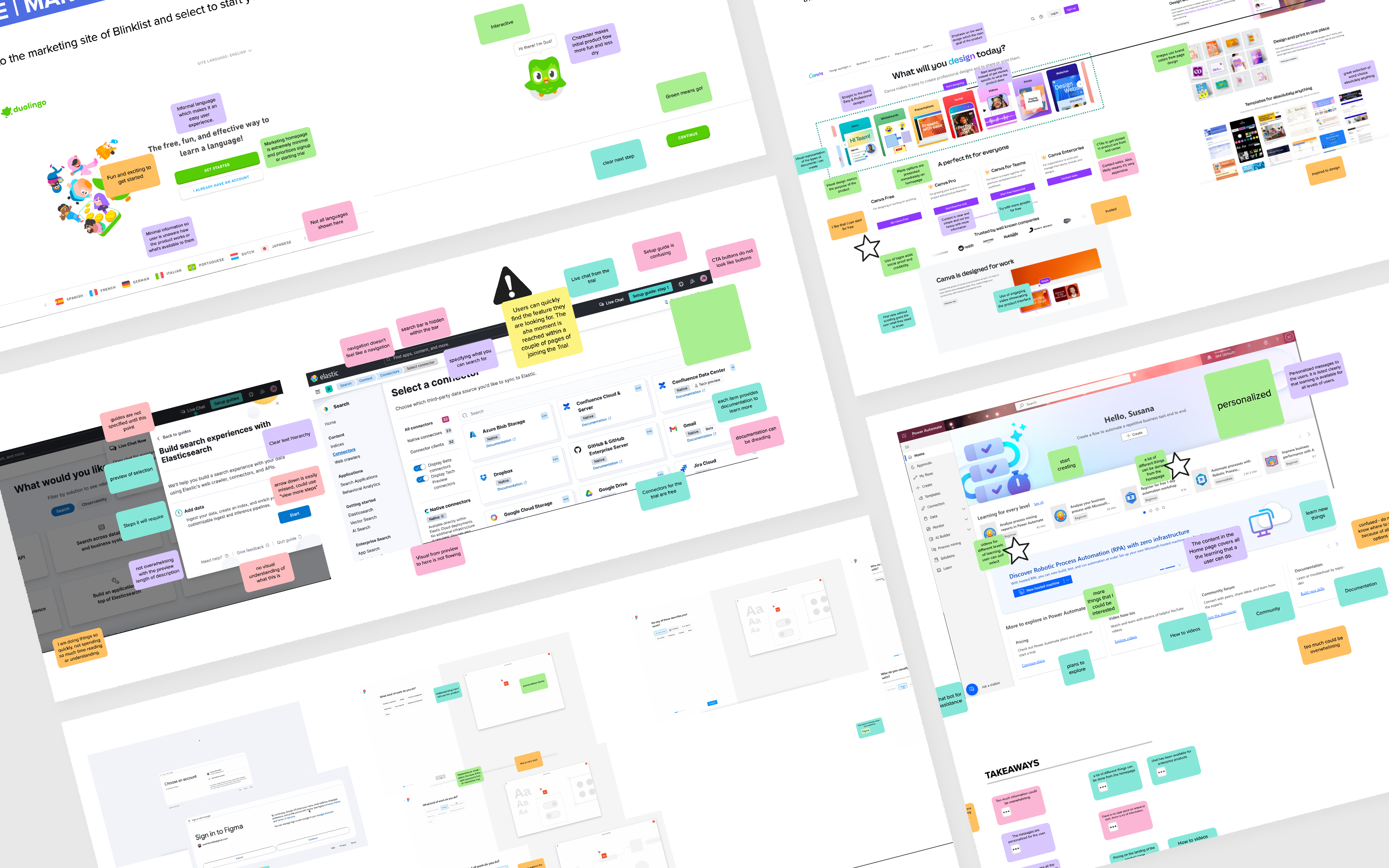
Another designer and I audited 22 products: 13 external, 9 IBM. I chose the external ones based on top App Store downloads and direct competitors to IBM software, products people use every day, known for great onboarding.
The biggest insight came from Figma and Monday. They made onboarding interactive before you even created an account. You were building your experience as a user, seeing the product's value, before putting your email in. One product went further: they didn't require login at all. The incentive to create an account was that your progress would disappear if you didn't save it. Users signed up because they wanted to, not because a modal blocked them.

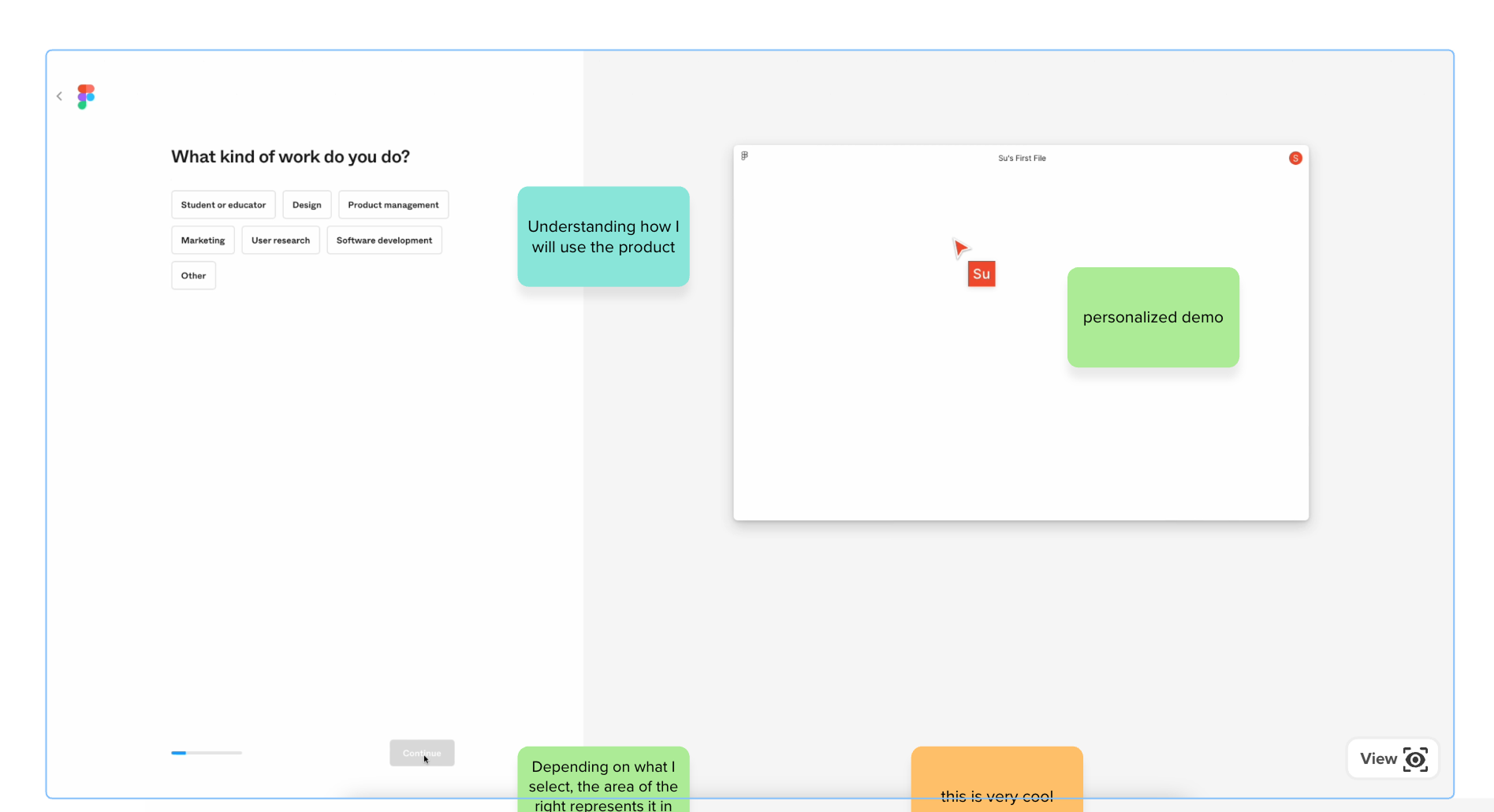
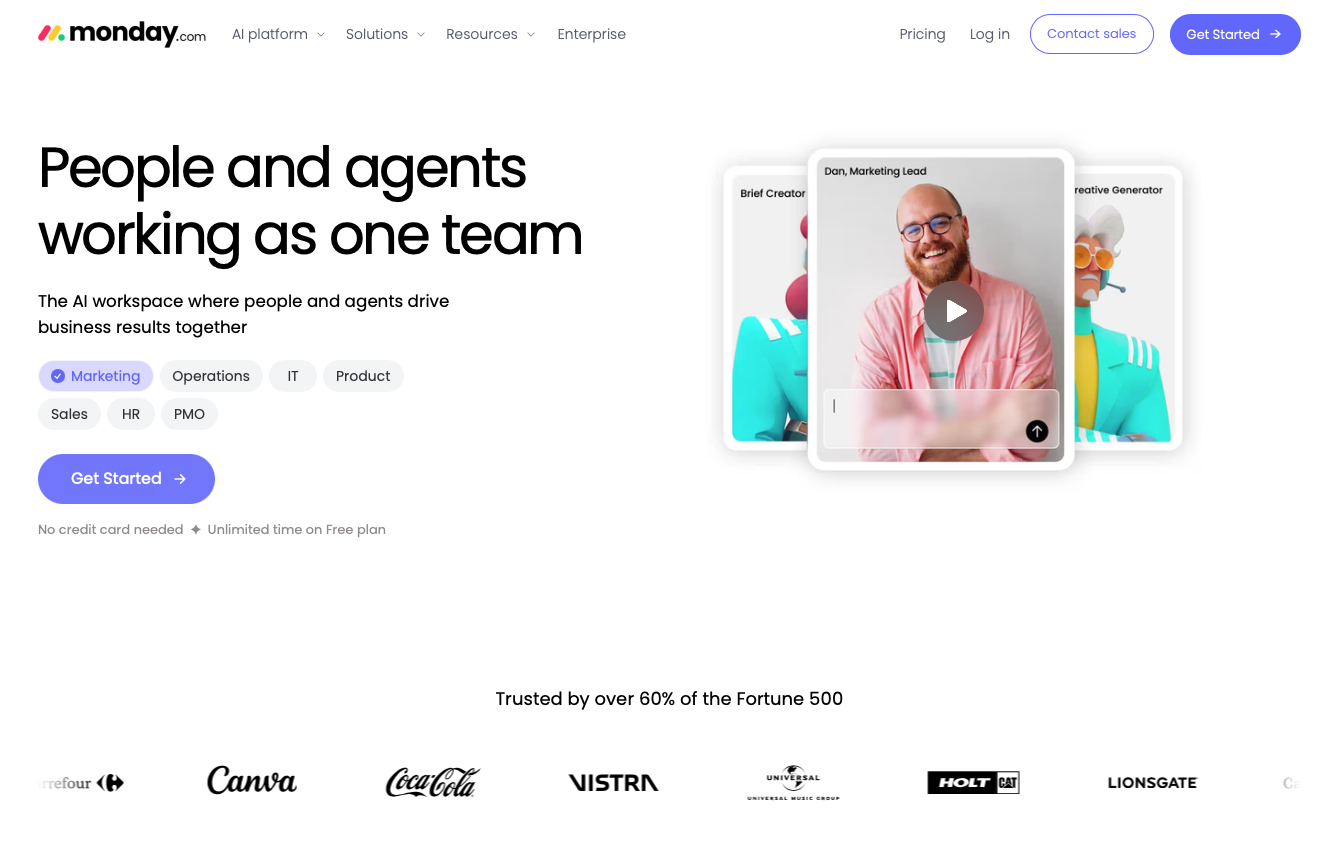
Three themes came through consistently:
Less friction. Keep onboarding focused. Every extra step is a reason to leave before seeing any value.
More relevance. Make it feel built for this specific user. Generic first experiences drive generic engagement.
Value first. Show what the product can do before asking users to configure it.
Best practices
100+ trial best practices published
I turned the audit findings into more than 100 best practices and published them to Carbon, organized by experience area: onboarding, personalization, time to value, walkthroughs, empty states. Teams accessed them through the PLG Design Guild, the biweekly calls I ran across IBM Software.
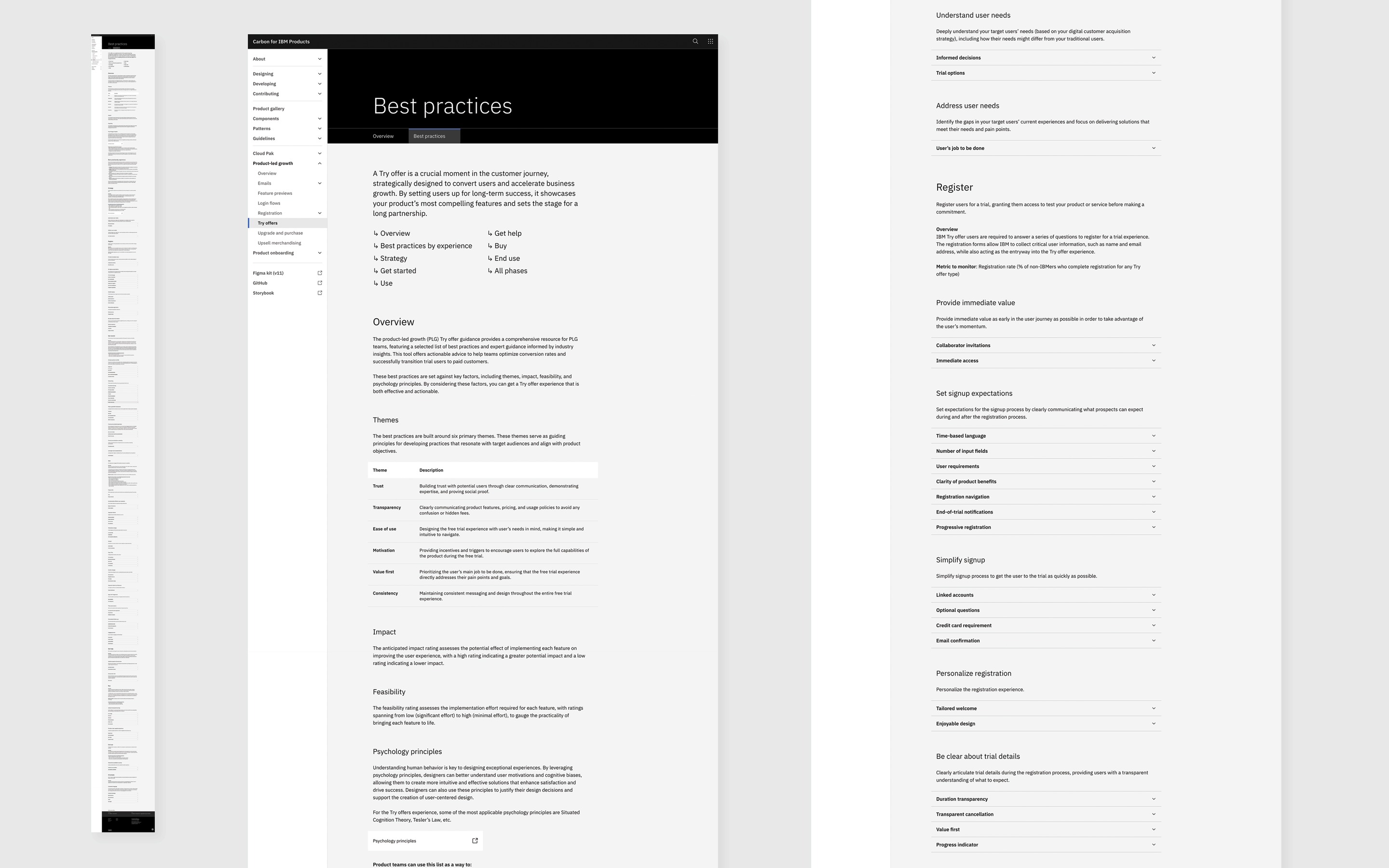
The problem was the format. Designers are busy. Reading through 100+ recommendations and imagining how each one translates into a real product experience wasn't working. So we started designing bite-sized vignettes: small visual examples showing a recommendation in practice, something a designer could look at in 30 seconds and understand.
But what if we showed instead of told?
Turning a best practice into an experience
My design principal assigned another designer and me to start designing bite-sized vignettes about the best practices — small visual examples showing each recommendation in practice. I chose to start with personalization and carried that thread all the way through to the Interstitial pattern and the Carbon contribution.
I started with personalization because all of the designs that follow are mine. It was the most consistent pattern across the research and ended up being one of the most viewed vignettes. That's what pulled me deeper into it.
Designing the personalization vignette meant going back into the research. I looked at what questions products were asking, why those specific questions, what they gave back in return, how they showed progress, and where drop-off happened.
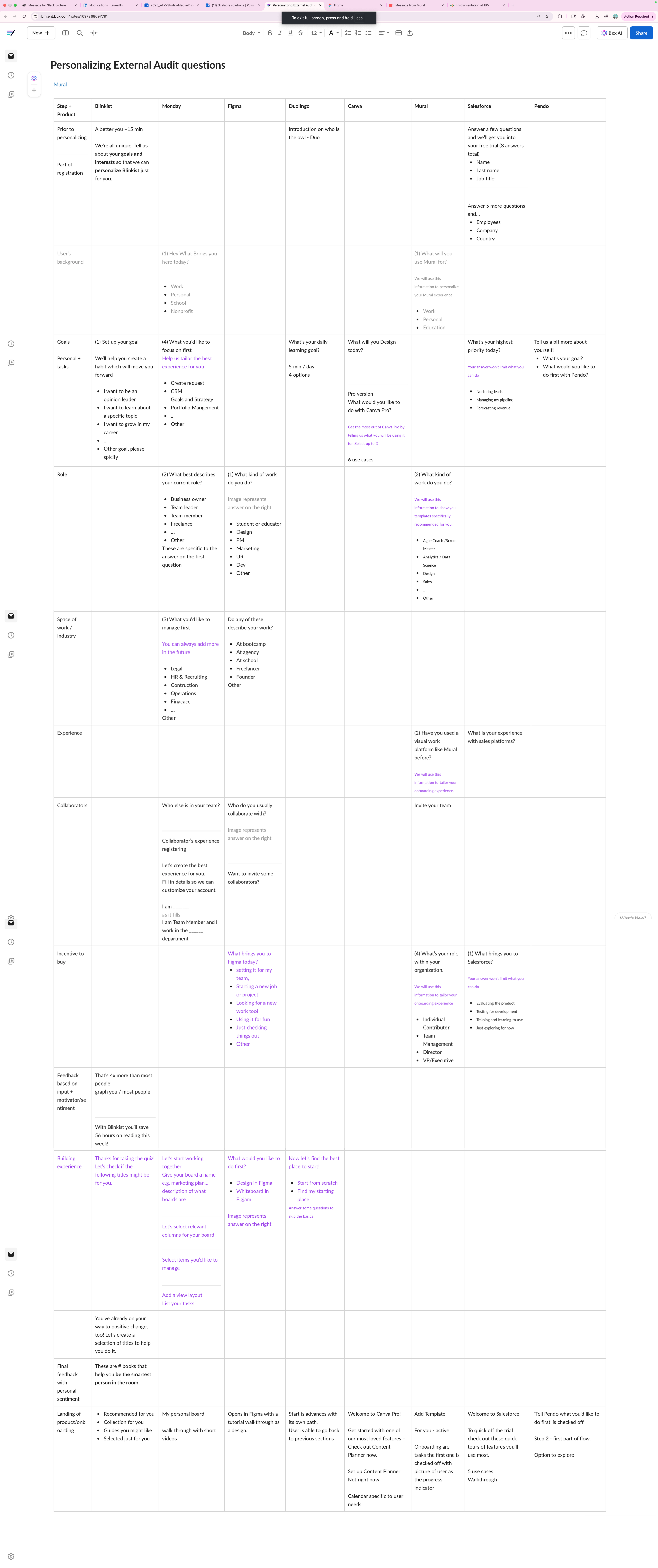
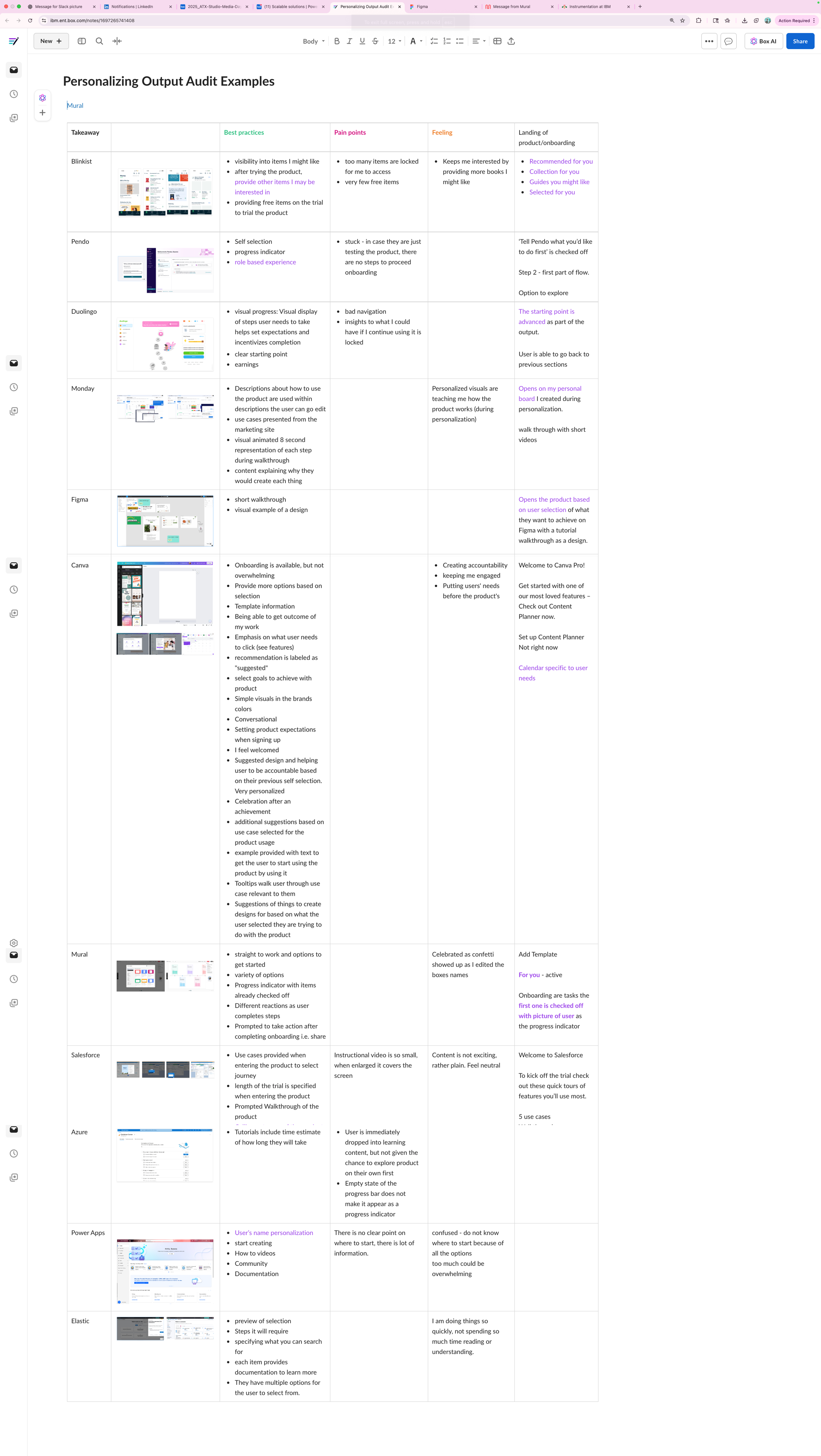
I mapped each personalization input to a meaningful product output. The question wasn't just what to ask, it was: if we ask this question, how will the product actually use the answer? Every question had to earn its place.
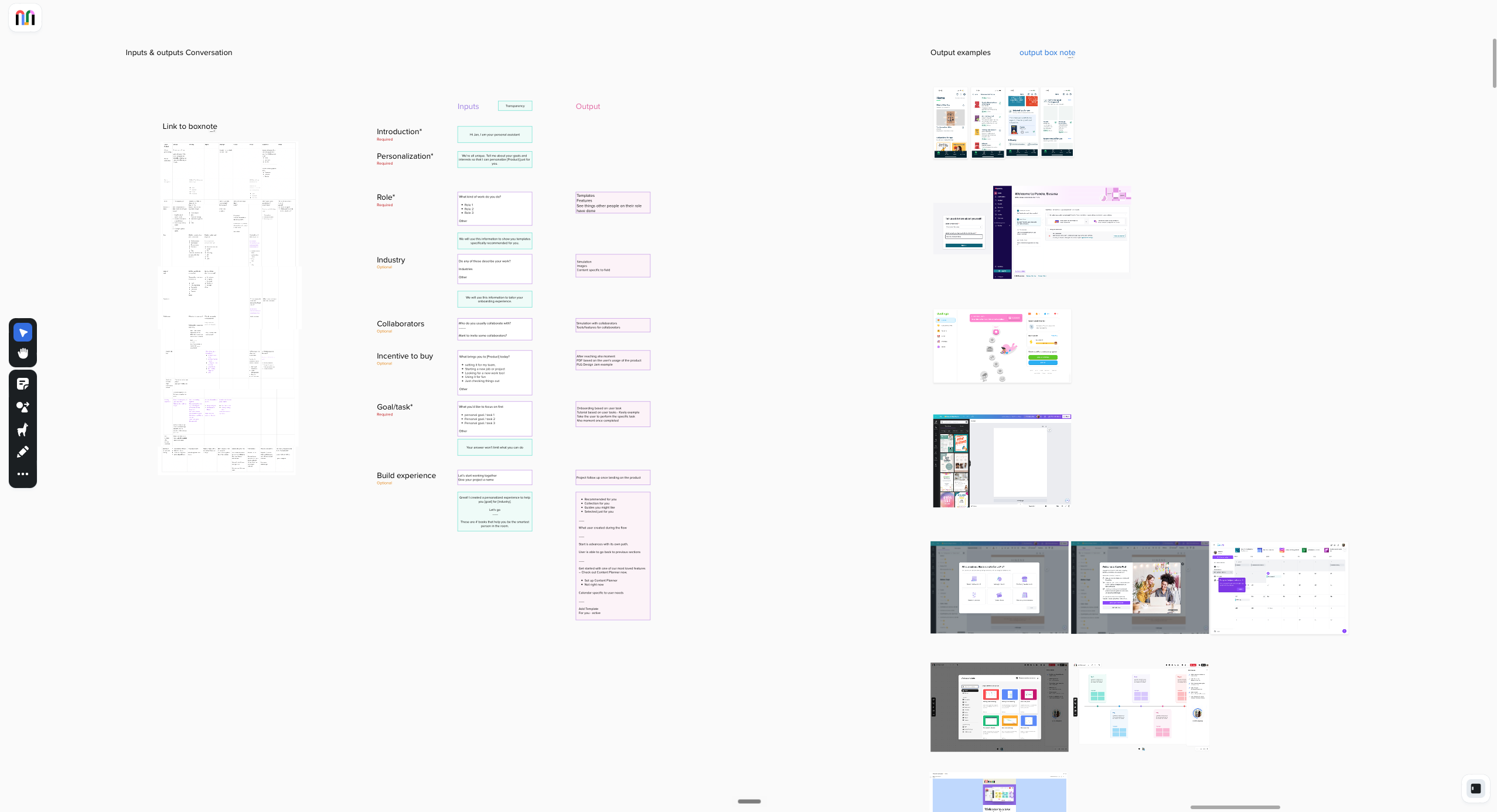
The three questions that shaped the pattern
These three questions, combined with other best practices like walkthroughs and guided tutorials, lower time to value and get users to the aha moment faster.
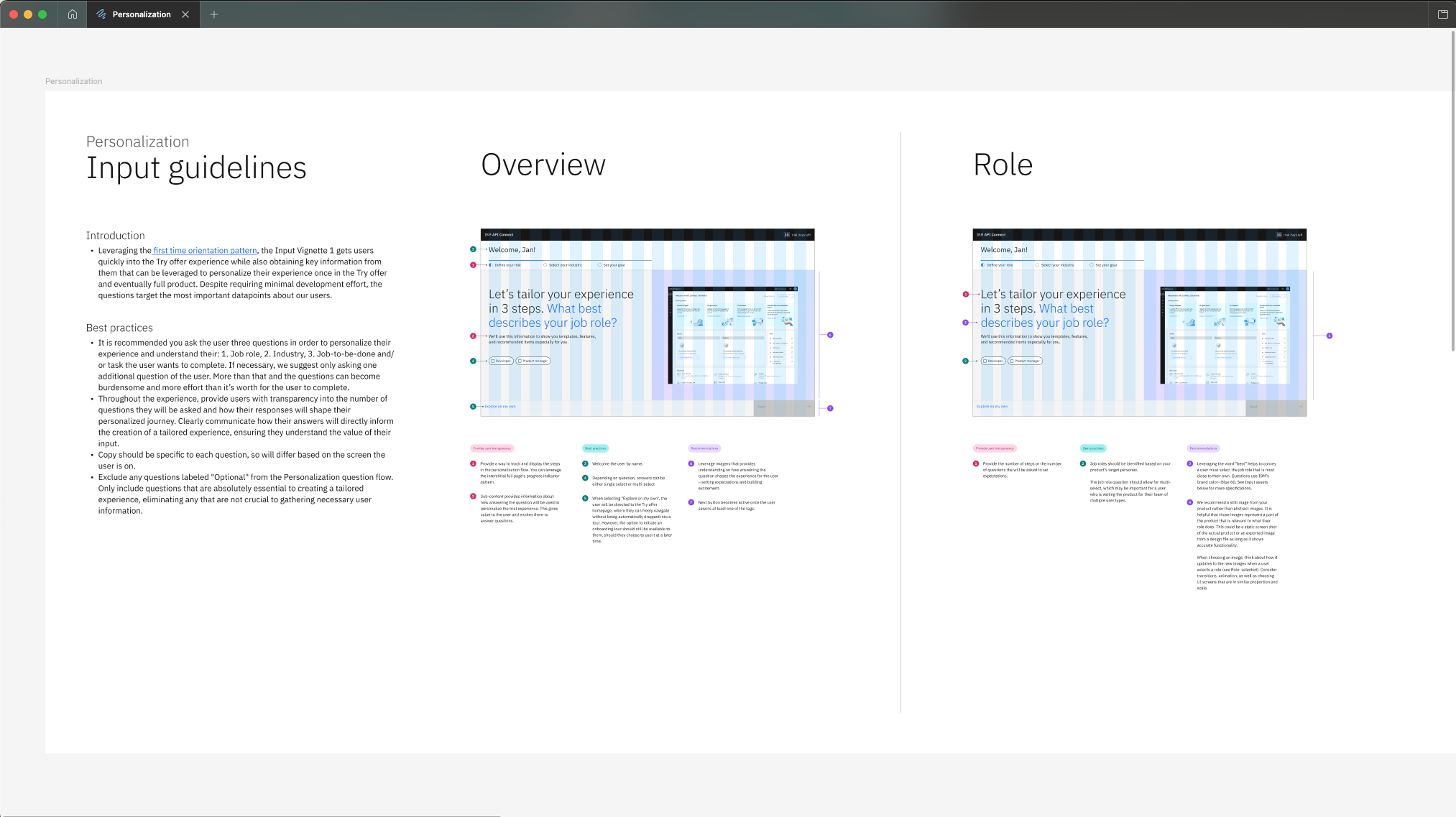
I designed two prototypes. The first was the Interstitial personalization experience. The second was a version using watsonx, pushing what the pattern could look like if our AI technology could power it, even before the technology was ready to support it. Designing ahead of the technology was intentional: it gave teams a vision to build toward.
Interstitial personalization — role, industry, job to be done
watsonx vision — designing ahead of the technology
Adoption
Products start to adopt the pattern. That's when the real learning started
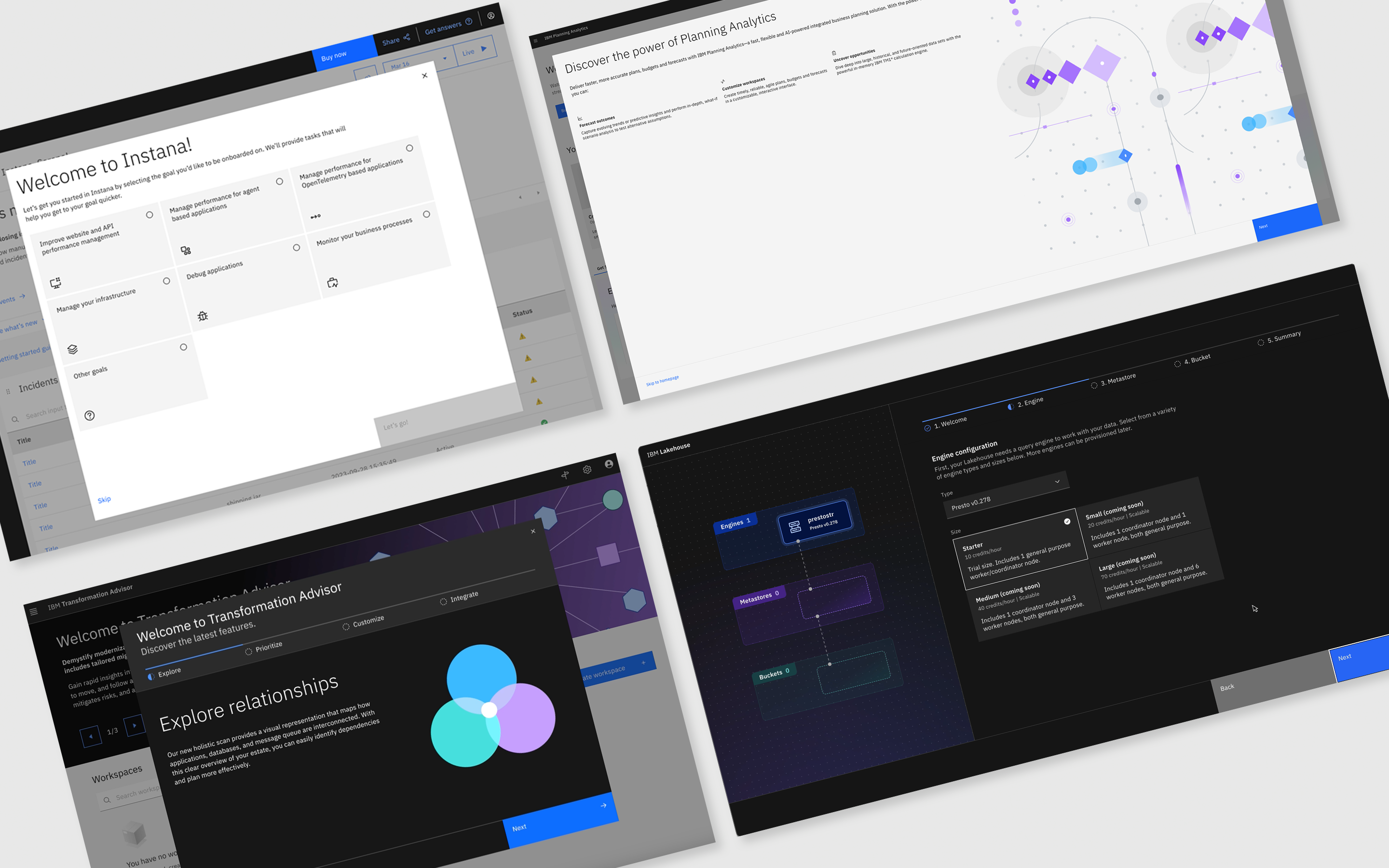
I presented the Interstitial formally to two communities: the PLG Design Guild, a recurring call I hosted with PLG product design leads across IBM Software, and the Carbon Design System Design Guild, which was open to any designer at IBM. From those presentations, teams started adopting the Interstitial on their own. I then met with teams directly — including Guardium, Instana, Transformation Advisor, Planning Analytics, and Lakehouse — to understand how they were applying it and where the pattern needed to flex.
The most instructive partnership was with Instana. They adopted the Interstitial early and were asking too many questions. Drop-off at the interstitial was higher than it needed to be. We came in, worked with them directly, and helped reduce the question count. The result was a 60% faster aha moment — users who went through the revised interstitial reached their first meaningful action in the product 60% faster than before. Instana became the proof-of-concept we referenced with every subsequent team.
How the 60% was measured: IBM PMs instrumented products in Amplitude in 2024. The measurement wasn't something I designed — the product teams owned it. But having that instrumentation in place meant we could see exactly where the pattern change had impact.
The Interstitial pattern
The transition between signup and product is where most drop-off happens. We designed for that moment specifically
The personalization work kept pointing to the same gap: the handoff between "I just signed up" and "I'm inside the product." That moment was where most users left, and where the opportunity to establish relevance was highest. That's the Interstitial.
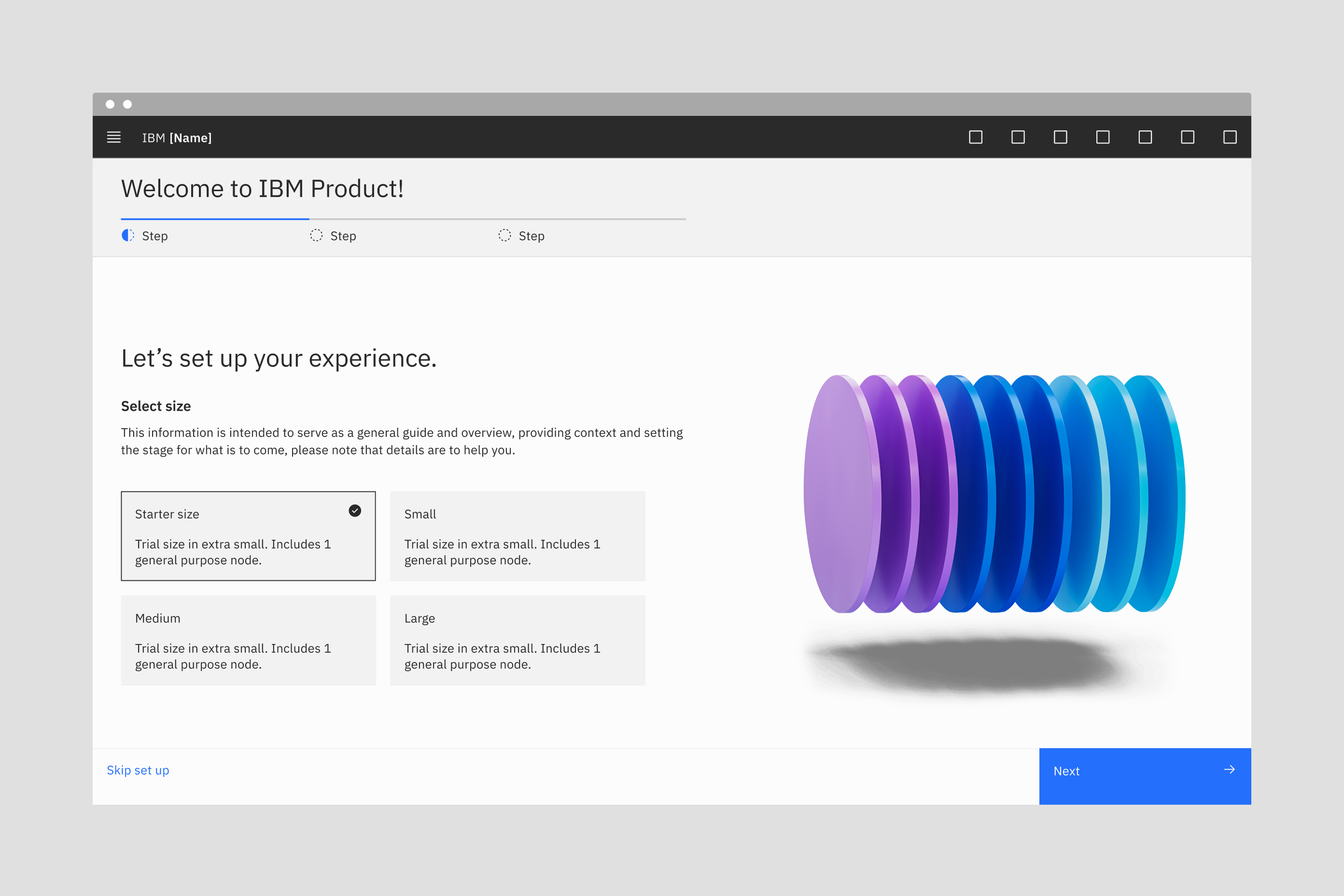
After identifying the use cases through research, I documented the three visual representations on the Carbon Design System site, each with a Figma file teams could access directly:
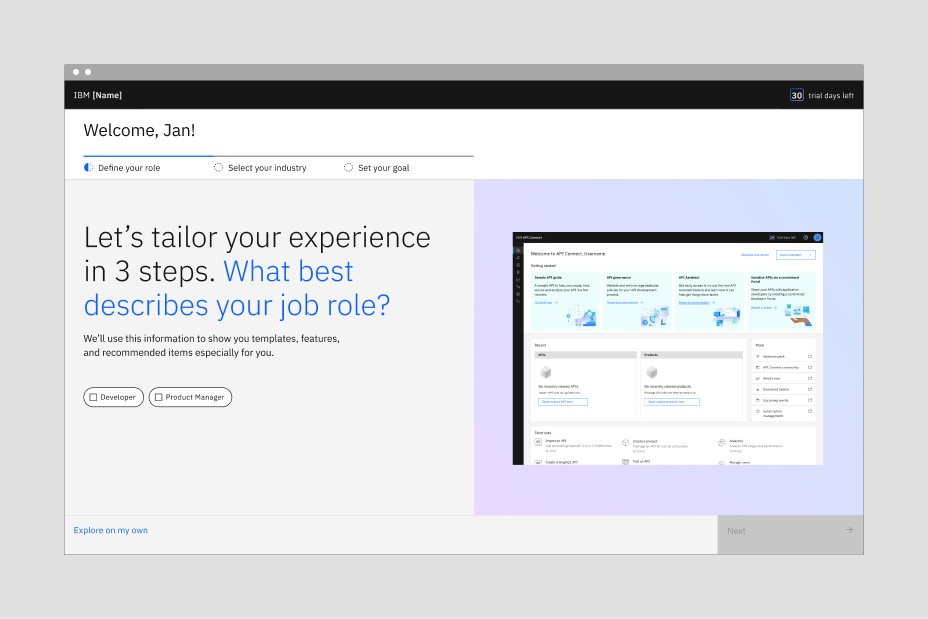
Personalization
The interstitial can be used to tailor a product experience based on a user's specific needs. Images used for personalization are more beneficial when they reflect the user's selections. Refer to Try offer best practices for guidance.
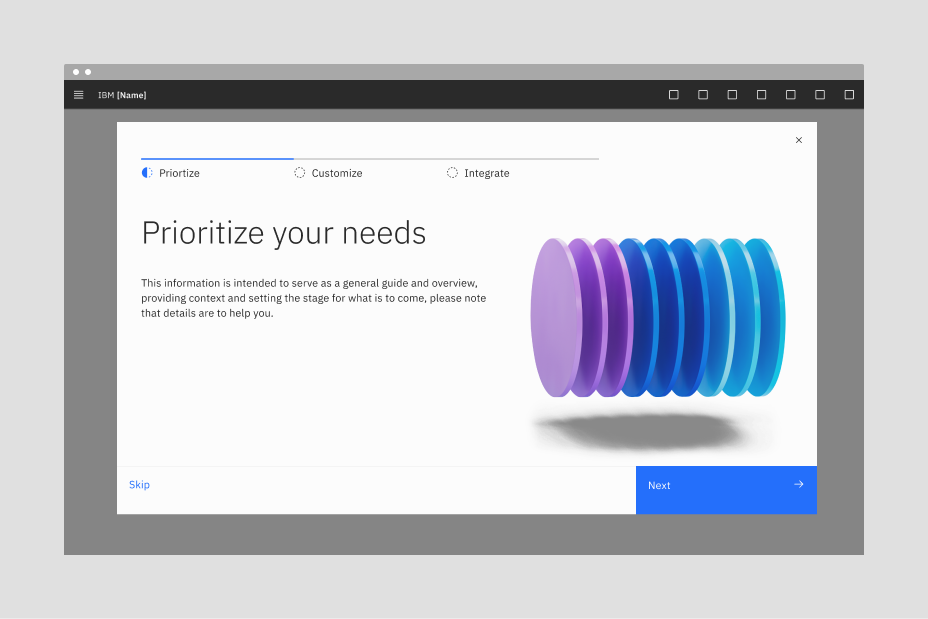
Product value
The interstitial can be used to introduce product value, a newly purchased add-on, or a significant update. Headlines can be added to emphasize the add-on or update.
Product setup
The interstitial can welcome new users, set expectations for the app's value, and guide them through short key setup steps — only if it helps shape the landing of the product for a seamless start. For additional setup steps, refer to the Get Started pattern.
The key tradeoff
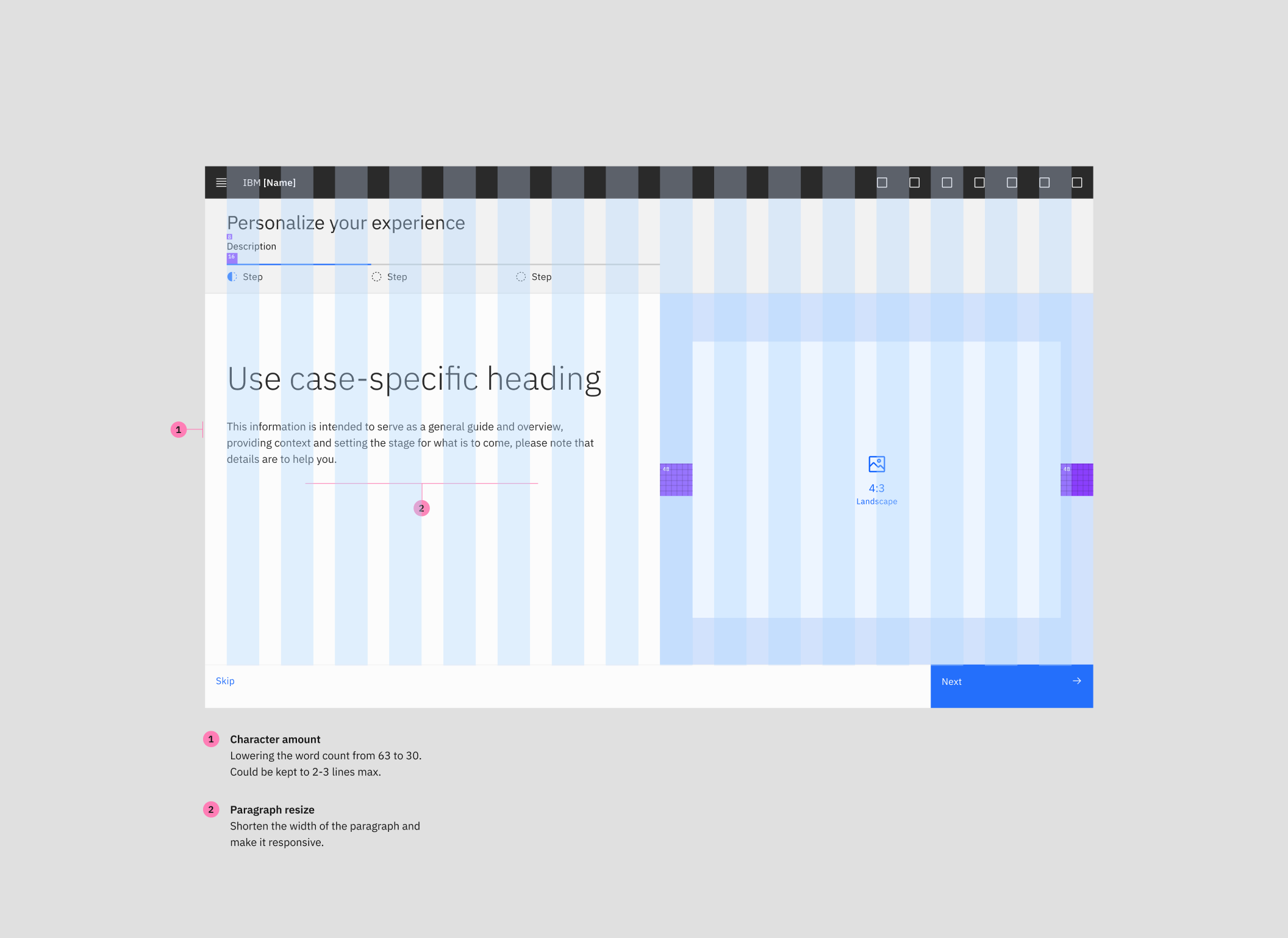
After real adoption, I went back to the Interstitial to make it more composable. Teams were customizing it from scratch every time, which created inconsistency. I talked to four teams already using the Interstitial to understand how they were applying it and what they needed to make it more flexible. That research informed a more modular version: teams could still maintain consistency with the standard, while having the flexibility they needed for their specific context.
I partnered with an engineer in India on this update, going back and forth through design comments to make sure there were no technical limitations in what I was proposing. I presented it to the Carbon team for approval, then back to the designers already using the Interstitial to validate it with people doing the real work.
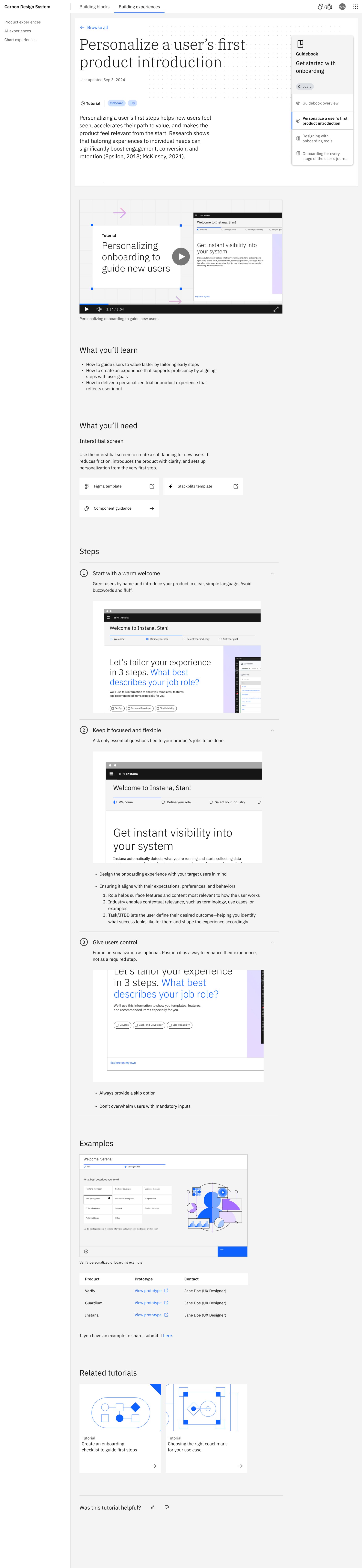
The research also helped define three clear use cases for the Interstitial, which I documented on the Carbon Design System site: personalization, product setup, and welcoming the user to the product. Teams now had a pattern, guidance on when to use it, and three real examples to build from.
Getting it into Carbon
Once we had the pattern and guidelines, the question became: where should they live
We could have created another PLG resource page. But that would mean asking teams to remember one more place to look. Instead, we asked: why not meet designers and developers where they're already working?
That's Carbon. IBM's design system, used by 324 teams, with 640k+ GitHub repos and 450k+ monthly visitors. Bringing the Interstitial into Carbon meant any team building a trial experience would find the pattern naturally, not because we told them to look for it.
My principal advocated for the work and that's how I ended up joining the Carbon team. The Carbon lead's response was immediate enthusiasm. No resistance. What came instead was an invitation to do more: I expanded into defining best practices and publishing to the Carbon site about the nine universal experiences and onboarding practices for IBM Software, a broader framework for how IBM products should think about their full trial arc.
We published the pattern with visual examples of all three use cases to the IBM Carbon for IBM Products site, the internal design system available to all IBMers. Teams now had the pattern, the guidelines, and real examples to build from in one place.

Scroll inside to explore the published IBM Carbon Interstitial guidelines
Where this led
The pattern worked. The documentation did not.
Watching teams pick up the Interstitial surfaced a second problem. Teams that found the guidance used it well. Plenty never found it. The pattern was in Carbon, but Carbon's documentation was written for reference, not for learning, so the guidance sat in long pages that busy teams skimmed and left.
That became the next project: research into how product teams actually learn a design system, and a rebuild of how Carbon teaches its patterns.
My role
Researcher, pattern designer, guild lead, and documentation architect
I owned this work end to end — from the initial competitive audit to the Carbon contribution to the tutorial format that will shape how IBM teaches design at scale. I ran the PLG Design Guild across IBM Software, led the research that produced the best practices, designed the Interstitial pattern and its implementation template, got it into Carbon, and partnered with teams like Instana to see how it performed in practice.
I also co-led the research on how teams use the Carbon site itself and owned the guidance and tutorial experience area for the 2026 Carbon site relaunch. This meant defining not just how one pattern is documented, but how every future pattern would be taught across a system used by 324 teams and 640k+ GitHub repos.
Throughout, I didn't manage any of the product teams. Every result came through influence, relationship building, and guidance concrete enough to act on.
What collaborators said
From the people in the room
"Collaborating with Susana on user activation and retention for IBM's Carbon Design System, I was able to learn from her strong UX instincts. She has a clear sense of how to design early product moments that meet users where they are and grow with them as they gain confidence. She's thoughtful about simplifying experiences so users feel supported at every step. Working with Susana feels like a genuinely collaborative experience because she shares her thinking openly, asks thoughtful questions, and brings others into the process in a way that elevates the work. Every UX solution she delivers reflects a real focus on clarity, momentum, and building experiences users want to return to."

Bridget Ndedge
Visual Designer · IBM
"From the moment Susana joined the Carbon Design System team, she has been keyed into the data and our users. Whether it's putting together and leading user interviews, aligning usage data to make better decisions, or pulling analytics to measure the team's impact, she always grounds her work in clarity and evidence. With limited resources, Susana consistently helped the team focus on the most meaningful opportunities — ones we would never have seen without her. She combines the best of data-centered and user-centered decision making in a way that makes the design team more strategic and impactful.
In design systems, it can be challenging to always stay connected to product teams, but Susana has a knack for keeping the communication lines open. She builds key relationships, learns user pain points, and makes a plan to ensure our efforts are truly solving the right problems. She thrives when she can directly connect and uncover the real story. She makes it easy to engage with teams and showcase impact. Our latest project was overhauling complex system guidance for both new users to Carbon and power users, and it showcased her ability to balance perspectives and design with empathy. Her work informed several key improvements to the guidance and set the stage for further updates."

Rich Kummer
Product Designer · Design Lead · Carbon Design System, IBM
Final impact
What this added up to
At the end of 2024, PLG VP Justin Youngblood announced to the PLG team that IBM Software's PLG efforts had contributed to a 10% revenue increase. That number was the result of every team that adopted the pattern, ran the experiments, and got users to value faster.
Revenue growth · IBM Software PLG
Announced by PLG VP Justin Youngblood at end of 2024, attributed to PLG efforts across IBM Software.
Faster aha moment · Instana
Users reached their key value moment 60% faster after implementing the Interstitial pattern. Measured in Amplitude.
Trial engagement · Concert
IBM Concert saw a 37% lift in trial engagement after adopting the onboarding best practices.
Products influenced
The Carbon Interstitial pattern and onboarding standards adopted by 39+ IBM Software product teams.
Best practices published
Published to Carbon and shared across IBM Software through the PLG Design Guild.
IBM teams on Carbon
Pattern available to every IBM product team through the Carbon Design System.
GitHub repos on Carbon
The Interstitial pattern and guidance accessible across the global Carbon ecosystem.
Monthly Carbon visitors
Tutorial redesign shaped how Carbon teaches patterns at scale for every visitor.
Reflection
What I'd do differently
If I did this project again, I'd partner with teams from the moment they started experimenting, not after they'd already made decisions. The Instana story was the most instructive thing that happened on this whole project — we learned the most by being in the room while they were actively testing. If I'd designed those partnerships earlier, we could have done A/B tests on the experimentations from day one, iterated on the interstitial in real time, and found more components worth building.
I'd also instrument the research on how teams use the Carbon site from the beginning rather than doing it reactively. The tutorial redesign came from observing what teams struggled with, but that observation was informal. With proper instrumentation from day one, I could have identified documentation gaps months earlier and gotten ahead of the misapplication patterns before they spread.
Three things this project taught me about senior design: Start with evidence rather than assumptions. Don't stop at designing the screen — think about the pattern, the guidance, the implementation, and the adoption. And treat shipping as the beginning of the learning loop, not the end of the design process.
Carbon Design System site redesign
Read the next case study